
Arrays In JavaScript
Arrays are the most fundamental part of javascript allow us to store data. In javascript arrays are the most used datatypes after objects. So it's important to know about arrays, their working, if you want to be a software developer you have to work with arrays because they are used in various place to store and handle incoming/ outgoing data.
What are arrays & Why we need them?
In JavaScript arrays are the special type of datatype which is used to store data. As you know variable stores a value, similarly arrays are used to store these data but in multiple quantity. JavaScript always tries to allocate contiguous memory to arrays so that we can access them easily iterate over them easily.
Array is not a datatype, even if you use typeof operator to know the type of the array it will return you object, and that's totally correct arrays are special type of object. They are used to store ordered collection of values.
How to create an array?
There are several methods by which we can create an array but we're going to discuss the major two only. First one is using Array constructor using new keyword this will create a new instance of Array class. Second, using Array literal ([]) this is the method we will use majority of time to create an array.
Let's Create an Array:
const countries = new Array()
console.log("Countries: ",countries);
console.log("TypeOf Countries: ", typeof countries);
console.log("Length Countries: ", countries.length);

-----------------------------------------------------------------------
OUTPUT:
Countries:  []
TypeOf Countries:  object
Length Countries:  0
Let's understand what happened here
We created a new array using new keyword in front of Array Object.
We stored the reference of that array in the variable countries.
We printed how countries array looks like, Here we got empty array.
We printed typeof array which is object.
Since there in no data in array and we have not explicitly mentioned the length of an array we are getting length of array as 0.
Let's make array with some length
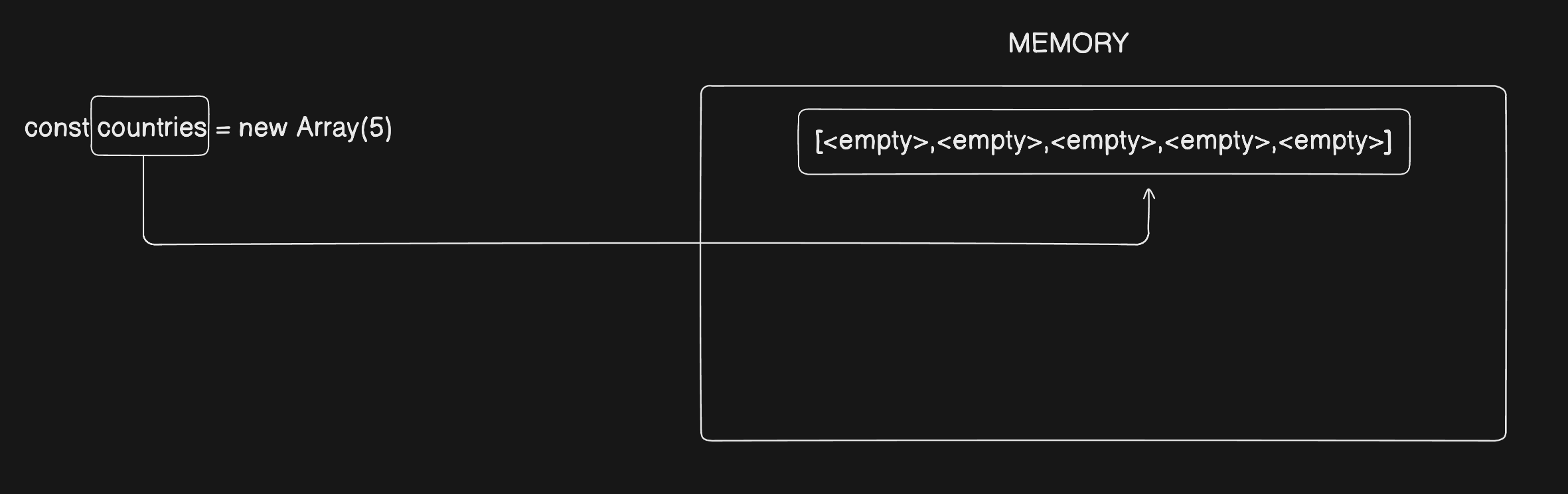
const countries = new Array(5)
console.log("Countries: ",countries);
console.log("TypeOf Countries: ", typeof countries);
console.log("Length Countries: ", countries.length);

-----------------------------------------------------------------------
OUTPUT:
Countries:  [ <5 empty items> ]
TypeOf Countries:  object
Length Countries:  5
You can clearly see, we have passed the length of array in Array() constructor.
We got an array with 5 empty items means the memory is allocated to the array but currently it's empty.
Type will be same Object.
Length of the array becomes 5, because we explicitly passed the length of array in Array constructor.
How it looks like in memory let's visualize
Another way, the simpler way to create an array is
const countries = []
console.log("Countries: ",countries);
console.log("TypeOf Countries: ", typeof countries);
console.log("Length Countries: ", countries.length);

const countriesAfter = ["INDIA", "USA", "RUSSIA", "FRANCE"]
console.log("Countries After: ",countriesAfter);
console.log("TypeOf Countries After: ", typeof countriesAfter);
console.log("Length Countries After: ", countriesAfter.length);

-----------------------------------------------------------------------
OUTPUT:
Countries:  []
TypeOf Countries:  object
Length Countries:  0
CountriesAfter:  [ 'INDIA', 'USA', 'RUSSIA', 'FRANCE' ]
TypeOf CountriesAfter:  object
Length CountriesAfter:  4
Accessing & Updating Arrays
Now you know that arrays are used for storing data. So how can we access that data, Arrays are indexed means we have number for accessing each value of array. Let's directly jump on the code part.
Accessing:
const countries = ["INDIA", "USA", "RUSSIA", "FRANCE"]
const firstElement = countries[0]
console.log(firstElement)

const lastElementIndex = countries.length -1;
const lastElement = countries[lastElementIndex]
console.log(lastElement)

-----------------------------------------------------------------------
OUTPUT:
INDIA
FRANCE
NOTE: Indexing always starts from 0 and the last value of index is always that array length -1

Updating:
const countries = ["INDIA", "USA", "RUSSIA", "FRANCE"]
const lastElementIndex = countries.length -1;
countries[lastElementIndex] = "GERMANY"
const lastElement = countries[lastElementIndex]
console.log(countries)

-----------------------------------------------------------------------
OUTPUT:
[ 'INDIA', 'USA', 'RUSSIA', 'GERMANY' ]
You can clearly see how we have updated "FRANCE" with "GERMANY".
NOTE: Since you know that arrays are under hood objects so, they are always pass by reference not by pass by value.
Looping Over Arrays
Everytime using indexing one by one will make our code verbose, and it's not a good practice. We already have a power of loop so instead of using indexing hard codedly one by one we can just iterate(loop) over the array using loops.
const countries = ["INDIA", "USA", "RUSSIA", "FRANCE"]

for(let i = 0; i<countries.length; i++){
    console.log("Element: " + i + " VALUE: " + countries[i])
}

-----------------------------------------------------------------------
OUTPUT:
Element: 0 VALUE: INDIA
Element: 1 VALUE: USA
Element: 2 VALUE: RUSSIA
Element: 3 VALUE: FRANCE
In JS we have so many different loops to iterate over arrays, like classic for loop, forEach loop, we have some advance methods which also helps us to iterate over array to implement some specific functionalities like .map(), .filter(), .every() & .some().
Conclusion
Arrays are a very important part of JavaScript because they help us store and work with multiple values in a single variable. By learning how to access elements, loop through arrays, and update values, we can manage data more easily in our programs. Once you are comfortable with these basics, working with arrays in real projects becomes much simpler.
