
Object Oriented Programming In JavaScript
Object Oriented Programming, this line itself explains what is this, it's a style of programming which is object oriented. We have multiple of styles of programming like Procedural programming, Functional Programming similarly we have OOPs (Object Oriented Programming). Object Oriented Programming is focussed towards objects not functions not pure logic.
What is a Class in Javascript?
Since now you know that OOPs is a style of programming oriented towards objects now let's understand who creates these objects & who defines properties of that object.
A class in Javascript is a blueprint for an object. It decides which properties & methods should a object should have. In simple terms, you can say that "A class describes what an object should look like and what it should do".
Why we need Classes?
Let's suppose you are working in your dream company let's say Netflix, now netflix uses OOPs style of programming and they have asked you to create objects of movies and tv shows. Now you know that netflix have collections of thousands of movies and TV shows you have two ways. Either you make all the objects manually or create an class and make all the objects using that class.
If you are that intelligent that you are, that's why you are working in Netflix i think you will opt for Classes.
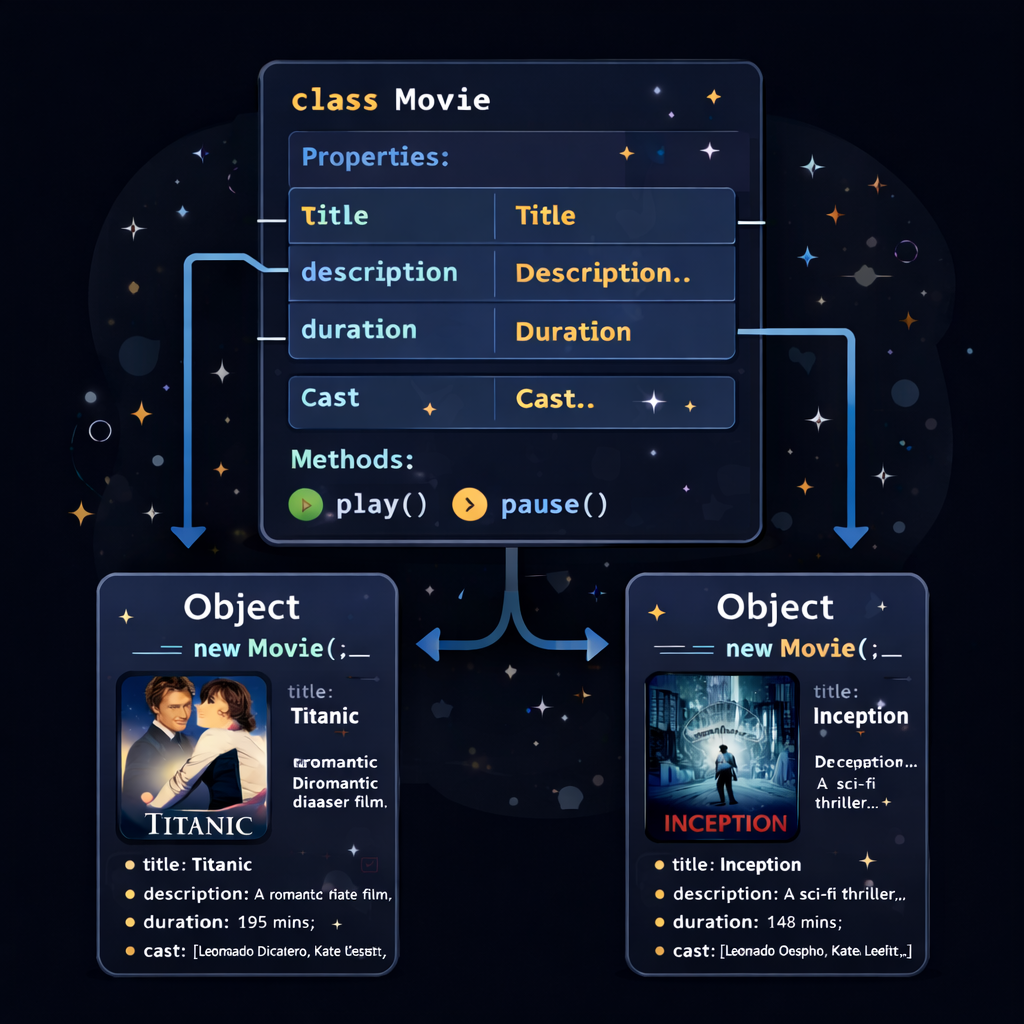
Inside classes you can define properties, in this case each movies object should have title, description, duration ,cast etc & you can define methods on it also like what will happen when you will click on that movie play , pause etc.
Yes, it looks like that properties are kind of variable inside classes and methods are functions in the classes, if you are thinking that it's correct partially but only for functions. There is slight difference in variable and properties.
See this image will help you to imagine this visually.
How to create Classes in JS?
For creating classes in javascript you simply have to use class keyword then inside this class scope you have to define properties and methods of that class.
class Movies {
    title = "Default Title";
    description = "No description provided";
    duration = "0 mins";

    play() {
        console.log("The movie is now playing.");
    }

    pause() {
        console.log("The movie is paused.");
    }
}

const myMovie = new Movies();
console.log(myMovie.title);
myMovie.play();

-----------------------------------------------------------------
OUTPUT:
Default Title
The movie is now playing.
This is how you create a class in javascript.
But now every time you will create a new object from this class will have the same title same description. Then for thousands of movies you have to create thousands of classes. For resolving this case we have constructor in classes.
Constructor in Classes
A special method used to initialize properties when an object is created.
Constructor method automatically called when you create a new object from a class using new keyword. It's main purpose is to initialize properties of object. Now if you will use constructor you don't have to create multiple classes for multiple object.
How to create Constructor inside a Class?
Constructor is a simple method of class you just have to use constructor keyword for creating constructor inside class.
class Movies {

    constructor(title, description, duration) {
        this.title = title;
        this.description = description;
        this.duration = duration;
    }

    play() {
        console.log(`Now playing: ${this.title}`);
    }

    pause() {
        console.log(`${this.title} has been paused.`);
    }
}


const movie1 = new Movies(
    "Inception",
    "A thief who steals corporate secrets through the use of dream-sharing technology.",
    "2h 28m"
);

const movie2 = new Movies(
    "The Dark Knight",
    "When the menace known as the Joker wreaks havoc and chaos on the people of Gotham.",
    "2h 32m"
);


console.log(movie1);
console.log(movie2);


movie1.play();

-----------------------------------------------------------------
OUTPUT:
Movies {
  title: 'Inception',
  description: 'A thief who steals corporate secrets through the use of dream-sharing technology.',
  duration: '2h 28m'
}
Movies {
  title: 'The Dark Knight',
  description: 'When the menace known as the Joker wreaks havoc and chaos on the people of Gotham.',
  duration: '2h 32m'
}
Now playing: Inception
In this example our constructor methods takes 3 arguments "title", "description", "duration" then it set these value for that object which is created using new keyword, that's why we have used this.description = description this line sets description property for that particular object only.
Then we have created two different object and logged them, you can clearly see the two objects created with different properties.
[NOTE]: Now for creating 1000's of movies object we just need one class so we can say that classes helps in code reusability and if we use classes we are following DRY principle of programming.
Methods inside a Class
When we write any functions inside a class they are said to be an method these methods get attached to every object which is created from that class. Then you can call that method using the object name and then dot operator and then method name like this movie1.play() .
Think of a method as a specialized function that has "inside information" about the object it belongs.
Syntax of Methods:
You simply have to write name of the method followed by parentheses (). No need of writing function keyword before method. Also you don't have to separate two methods using comma. You can simply write two methods below each other without comma separation.
class Movies {
    constructor(title, genre, duration) {
        this.title = title;
        this.genre = genre;
        this.duration = duration;
        this.isPlaying = false;
    }

    play() {
        this.isPlaying = true;
        console.log(`Now playing: ${this.title}`);
    }

    pause() {
        this.isPlaying = false;
        console.log(`${this.title} is now paused.`);
    }

    getDetails() {
        return `\({this.title} | Genre: \){this.genre} | Duration: ${this.duration}`;
    }

    updateDuration(newDuration) {
        this.duration = newDuration;
        console.log(`Duration updated to: ${this.duration}`);
    }
}

const movie1 = new Movies("Interstellar", "Sci-Fi", "169 mins");
const movie2 = new Movies("The Godfather", "Crime", "175 mins");

console.log(movie1.getDetails());
movie1.play();
movie1.updateDuration("2h 49m");

console.log(movie2.getDetails());
movie2.play();
movie2.pause();

-----------------------------------------------------------------
OUTPUT:
Interstellar | Genre: Sci-Fi | Duration: 169 mins
Now playing: Interstellar
Duration updated to: 2h 49m
The Godfather | Genre: Crime | Duration: 175 mins
Now playing: The Godfather
The Godfather is now paused.
Here, play(), pause(), getDetails() & updateDuration() all these are methods. And when you are making new objects they are getting attached to the object having the context of that object.
Types of Methods:
There are mainly three types of methods:
Instance Methods: These are available on every object you create. If you have 1000 movie objects, they all share these don't need data from a specific movie.
Static Methods: These belong to the class itself, not the individual objects. You use them for utility functions that don't need data from specific movie.
Getters & Setters: They allow you to execute code when someone tries to "get" or "set" a value.
Conclusion
Object-Oriented Programming in JavaScript helps us organize code using classes that act as blueprints for creating objects. Classes allow us to combine data (properties) and functions (methods) into a single unit, which makes code easier to understand and maintain. They also support the idea of encapsulation, where the data and the operations on that data are kept together inside the object. This helps in writing cleaner, more structured, and reusable programs.
